Features Ad Serving
Default and Secondary Zone
A zone can have another zone as default or secondary. In case no ad can be selected from the active primary zone, our ad server will try to fetch ads from the default/secondary zone.Chain of Zones
You have the flexibility to create a chain of zones with several layers for a more advanced ad serving sequence. For example:- Zone A is the primary zone
- Zone B is secondary to Zone A
- Zone C is secondary to Zone B
- The ad flow will be A then B then C
Setting a Secondary Zone
- Click on a zone
- Click on the "Edit" tab
- Under the "Advanced Settings" section, you will find the drop down to set a secondary zone
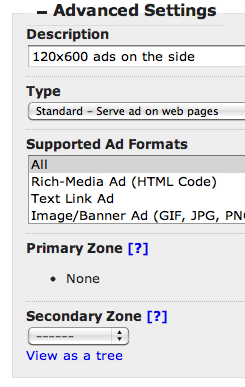
View a Zone Chain Report
- Click on a primary zone name. It could be the starting point of a zone chain or a zone in the middle of the chain
- Click on tab "Reports", click on "Basics / Daily"
- Click on tab "Secondary Zones"
- Click on "Secondary Zone Impressions" or "Secondary Zone Clicks" to view the breakdown report
How do I show default/house ads after serving all premium inventory?
In a typical scenario, premium ad inventory brings in more revenue, and you hence would like to finish serving those ads first before showing other ads such as in-house ads or remnant ads. In order to do this, you would need to create two zones: Zone RemnantHouseAds is the secondary/default zone for zone PremiumAds.Zone PremiumAds links to 3 premium ads (X,Y, and Z). If all ads in zone PremiumAds cannot be displayed because of their restrictions (i.e. ad expires, impression quotas reached, geotargeting failed, etc.), the system will automatically look for ads in the secondary zone RemnantHouseAds.
Exclusivity
If an advertiser wants to place ads exclusively, you can use 3-level zone chaining. The flow of ad selection based on the quality of inventory would be:- Premium/Exclusive Zone: contains only the premium ad(s)
- Standard Zone: contains second-in-priority ads
- Remnant Zone: contains low priority house ads
Considerations
All serving settings, including ad dimensions and all restrictions, are independently applied to ads in the secondary/default zone. For example: if no 468x60 ad in zone PremiumAds can be served and you do not have any 468x60 ad in zone RemnantHouseAds, an error message will be displayed.Example - Fill remnant ad space with ads from ad networks
Your total ad inventory is 500,000 impressions per month but you only sell 300,000 impressions. You want the remaining 200,000 to be ads from ad networks (like Google AdSense). Here is how to set it up:- Create 2 zones: Zone A for premium ads, zone B for ad networks. Edit zone A and set zone B as its secondary zone.
- Create a new ad, choose the type to be "Rich-Media/HTML" and paste in the Google AdSense tag.
- Link this AdSense ad to the secondary zone. If there is no premium ad available, an ad from secondary zone will be selected.
Example - A chain of ad networks
To maximize your advertising revenue from multiple ad networks, you can setup a chain of ad networks: from more premium ad networks to generic/fill ad networks. Here is how to set it up:- Create multiple zones, one for each tier of ad networks. For example: Tier 1, Tier 2, Tier 3
- Set the primary/secondary zone chain: Tier 1 => Tier 2 => Tier 3
- Create the ad with their ad tag from the networks. You can apply any applicable settings and restrictions to maximize your earning potential. For example: restricted to US visitors and capped at 10 impressions per day
- Link the ad(s) to their corresponding tier zone
- Get the serving code for Tier 1 zone and paste it to your site
Example - Limit one premium ad per page or section
You have 3 premium ads and one default ad. Each premium ad should display on one specific page or section. Any page or section without a premium ad should display the default place holder ad. In this case, you should use a zone chain and URL targeting as described below:- Zone PremiumAds links to premium ads: A, B and C
- Zone DefaultAds links to place holding ad: D
- Zone DefaultAds is set as the secondary zone of PremiumAds
- Ad A has a URL restriction to show to URL A
- Ad B has a URL restriction to show to URL B
- Ad C has a URL restriction to show to URL C
- You generate the serving code for zone PremiumAds and place it on your website.
More Examples
Other Articles in Ad Serving
Features of our ad server that display ads to your viewers, record ad metrics like impressions and clicks.
- Ad Formats and Ad Dimensions
- Ad Optimization
- Ad Tag and Serving Code
- Ad Targeting
- Ad Tracking
- Competitive & Companion Positioning
- Email Ad Serving
- Mobile Ad Serving
- Native Ad Serving
- Priority in Serving Frequency
- Roku Ad Serving
- Secure Ad Serving with SSL
- Text Link Ads
- Video Ad Serving
- VMAP Video Ad Serving
- Zone Targeting and Campaign Targeting
Cannot find an answer for your question? Ask our Customer Care team
Related
- How do I setup a passback ad tag?
"When you serve multiple ads from different ad servers and ad networks, some vendors might not have any available or ..."
- How do I generate breakdown reports?
"When viewing a report for an entity, you have an option to drill down into more details. You can view ..."
- Zone
"Zone is ad placement. A zone consists of one or more ads. Zones display, serve, shuffle, cycle, randomize, and rotate ..."
- How do I troubleshoot "Restrictions Failed" error?
"This error message is displayed when one or more restrictions (targeting criteria) for an ad, zone, or campaign have failed ..."
- Zone Targeting and Campaign Targeting
"In additional to putting restrictions on any individual ad, you can put restrictions on any zone or campaign. Restrictions for ..."