Help Center Manage Your Account Ad Tag
How can I avoid duplicate ads on the same page?
A single web page can have multiple advertising ad placements. For example, three 100x100 buttons display next to each other (top, middle, bottom). There are 2 methods to make sure an ad is not displayed twice on a single page:- Single ad call approach (recommended)
- Spot number (see below)
Spot Number
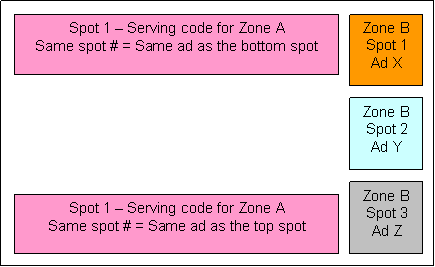
When getting serving code for any zone, you can specify the spot number for that serving code. You can set the spot number so that they serve different ads or the same creative.- Different spot number for a different ad: If spot #1 already shows ad X then spot #2 will not show ad X again. It will show ad Y.
- Same spot number for the same ad: If spot #1 on the top shows ad X, spot #1 placed at the bottom will also show ad X again.
Performance
Spot feature can be slower if there are many ad placements on a page. In this case, you should use the single-request ad invocation code to load multiple zones in one trip, or set the number of ads to display together within a single zone's serving code.Other Articles in Ad Tag
This section describes the ad tag (serving code) with basic and advanced settings. It includes common ad serving setup instructions and answers frequently asked questions when integrating the ad tag into your site, blog or app.
- Accelerated Mobile Pages Project - AMP Ad Tag
- Can I have ads refresh automatically without a page reload?
- How can I avoid document.write warning in Chrome?
- How can I combine multiple ads in the same placement?
- How can I defer ads until after the page has finished loading?
- How can I display an ad only when it is visible on screen?
- How can I measure ad viewability?
- How can I mix ad dimensions or mix banners with text-link ads?
- How can I put ads into my blog/website?
- How can I serve multiple ad dimensions in the same place?
- How can I serve multiple zones with a single server request?
- How can I support click tracking for external ad servers?
- How can I turn off ad serving error messages?
- How do I add current timestamp into the serving code?
- How do I display mobile ads using Android WebView?
- How do I display mobile ads using Apple iOS WKWebView?
- How do I integrate AdSpeed mobile ad serving API?
- How do I make ads responsive on mobile devices?
- How do I pass custom data and variables into the ad?
- How do I set up advertising on WordPress?
- How do I setup a companion ad in video ad serving?
- How do I setup a passback ad tag?
- How do I switch to secure SSL/https ad serving?
- Should I use protocol-relative URLs in ad tags?
- What are custom ad serving settings and variables?
- What are different formats of serving code?
- What are different types of ad tag?
- What are the effects of ad blocking software?
- What is the pop-up and pop-under ad tag?
- What is the serving code or ad tag?
- What is WMODE for SWF ads? How can I change it?
- Where is the publisher-side file for iframe busting?
- Why doesn't the provided HTML serving code work?
Cannot find an answer for your question? Ask our Customer Care team
Related
- Companion & Competitive Positioning
"Competitive positioning prevents a certain ad from showing on the same page with another ad. Companion positioning, or roadblocking, tries ..."
- Ad Tag and Serving Code
"Rotating Multiple Ads or Serving One Specific Ad You can choose between two types of rotation: rotate multiple ads within ..."
- What is the serving code or ad tag?
"Ad Tag (serving code, invocation code) is a small piece of HTML code that you copy and paste into your ..."
- How can I serve multiple zones with a single server request?
"This method is highly recommended if you have 3 or more ad placements on a page. It combines all ad ..."
- What are different types of ad tag?
"There are 2 types of ad tag: for each Zone and for each ad. For a specific Zone This ad ..."