Fast Delivery and Ad Media Manager

Upload media files, banner images,
HTML5 ads, and video ads directly onto our
ad server instead of hosting them on your own web servers. Our global network of servers will host and deliver these files quickly to your viewers no mater where they are. This
ad hosting add-on provides you with many benefits.
- Convenient. Uploading and managing media files is easy with just a couple clicks. You can simply browse an image file on your local computer. No need to contact a webmaster or IT team
- Fast. Deliver ads quickly to your visitors through our geographically-diverse content delivery network (CDN) of servers
- Reliable. No more broken links in case you need to update the media file
- Cost-Effective. Save your web hosting's bandwidth, which can be more expensive than our bulk bandwidth pricing
- Secure. Your uploaded images and media files are available in both standard and secure URL (SSL/https)
Pricing
The price of Fast Delivery add-on is listed on our
Pricing page
Usage
Once you
subscribe to this add-on, you can access it through menu
My Account/ Add-ons/ Fast Delivery and every time you create a new ad.
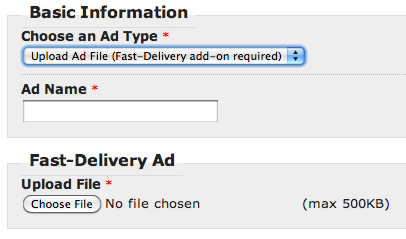
- Creating a new ad - When creating a new ad, you can choose to browse and upload an image file from your local computer instead of having to upload the image to your own server and enter its web address (URL) into the input field.
- Media Manager - This dedicated interface is designed to manage multiple images and assets that you use within more complex ads, often Rich-Media ads with multiple image components. When you add an image into the media manager, the system will provide an image URL for you to use in the HTML ad code.
File Types and File Size
The maximum file size is 500 KBytes per file. Supported file formats include JPG, GIF, PNG, BMP, MP4, FLV, Flash/SWF, and ZIP (HTML5 ad). If you need more bandwidth, storage, or a higher limit on filesize, please contact us.
Bandwidth
A 10kb (kilobytes) banner displays 100,000 times would take about 1 gigabytes (GiB) of bandwidth
10 x 100,000 = 1,000,000 kilobytes
Related
- Ad Server for Ad Networks
"Do you want to build your own ad network? Do you have great relationships with many publishers and advertisers? If ..."
- Private Branding / White Label
"A white label ad server uses your company's name, logo, text instead of displaying our version. It builds your brand ..."
- Ad Server for Agencies
"An ad agency plans, designs, creates, manages and buys advertising on publisher's properties for its clients, the advertisers. AdSpeed ad ..."
- Ad Server for Advertisers
"Advertisers purchase advertising from many different sources, including individual websites, mobile apps, ad networks, and ad exchanges. In this complex ..."
- Ad Server for Publishers
"As a publisher, you own and operate a website, blog, forum, or an app with available advertising spaces. Advertisers pay ..."