Help Center Troubleshooting Problems with Ad Serving
Why doesn't the status bar change?
This feature changes the browser's status bar to display a certain string when you move your mouse over an ad. To prevent phishing and other malicious attacks that mislead visitors, most browsers by default no longer allow this functionality. The browsers will show the full link/URL that the visitor is going to click when the mouse hovers a link. Therefore, we do not recommend using or relying on this feature for your ads.Browser Setting
All browsers have different options to enable and disable certain JavaScript behaviors. For example, here is the setting in Mozilla Firefox:- On the menu, follow Tools\Options\Content
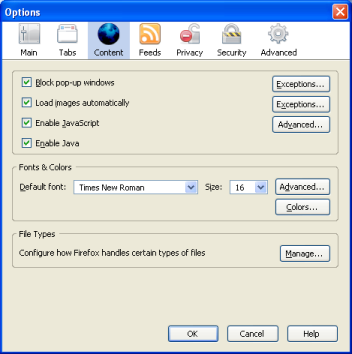
- Next to "Enable JavaScript" (check if it's already enabled), click on Advanced
- From here, you can enable/disable certain JavaScript features:
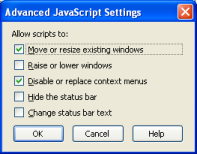
- Move or resize existing windows
- Raise or lower windows
- Disable or replaced context menus
- Hide the status bar
- Change status bar text
Demo and HTML Code
Move mouse over this link to change status bar messageThis is done with the following JavaScript code:
<a href="javascript:;" onmouseover="window.status='Some Message'; return true;" onmouseout="window.status=''; return true;">Change Status Bar on Mouse Over</a>
Other Articles in Problems with Ad Serving
Instructions to troubleshoot and correct issues with ad serving
- How do I see ad or page errors with the browser's Console tool?
- How do I troubleshoot "Invalid Ad Type" error?
- How do I troubleshoot "No Ad Found In Rotation" error?
- How do I troubleshoot "Permission denied" error for a Flash ad?
- How do I troubleshoot "Restrictions Failed" error?
- How do I troubleshoot clickTAG issues for a Flash ad?
- How do I troubleshoot my ISP's nameservers?
- What are VAST error codes?
- What is "Click to activate and use this control" message on a Flash ad?
- What is "Object Expected" error in Internet Explorer?
- Where can I see a report of ad serving errors?
- Why does ad server deliver above the maximum impression limit?
- Why don't ads show? What is the system status?
- Why isn't one of my ads showing?
Cannot find an answer for your question? Ask our Customer Care team
Related
- Website
"Documentation for API methods to manage one or multiple websites. API Version1.5.2 (build 20260514). This page was updated on Fri, ..."
- Creative
"An ad creative displays on publishing sites and it can be in any format: image/banner ad, text link ad, Flash ..."
- How do I see ad or page errors with the browser's Console tool?
"All browsers (Chrome, Firefox, Safari, Edge, Brave) provides detailed technical behind-the-scene information when you experience a problem with ad display ..."
- How do I test if my browser supports JavaScript?
"We use JavaScript to deliver advanced functionalities through our graphical user interface. Our adserver is compatible with major browsers including ..."
- Ad
"An advertisement is a message served on publishing sites or apps and it can be in many different formats, including: ..."