Help Center For Publishers
Ad
An advertisement is a message served on publishing sites or apps and it can be in many different formats, including: image banner ad, text link ad, Flash/SWF ad, HTML5 ad, movie, video/audio clip, HTML/JavaScript code, or Rich-Media ad tag from third-party ad vendors.Relationship
An ad can link to multiple Zones, multiple Groups, and an Advertiser.Similar terms
Creative, banner, advert, advertisementAd Management
You can see a list of ads when you follow the menu Ads / All. There are a row of buttons on the top right and bottom left so you can perform the most frequent ad tasks.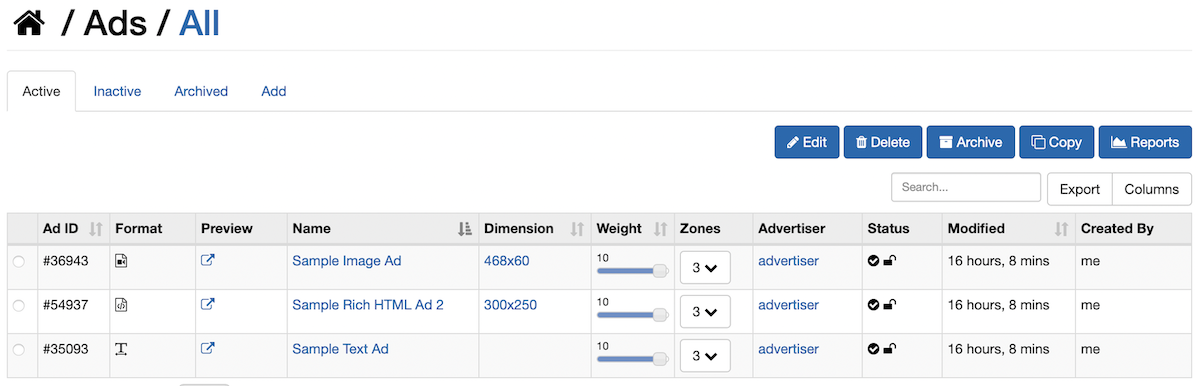
Create a New Ad
- Sign into your account, follow the menu Ads/ Create a New Ad
- Click on the Add tab to enter the new ad's information
Link an Ad to a Zone
- Sign into your account, follow the menu Ads / All
- Click on the ad name
- Click on Relations tab and then All Zones tab
- Check the box next to a zone name to link to this ad
Link an Ad to a Group
- Sign into your account, follow the menu Ads / All
- Click on the ad name
- Click on Relations tab and then All Groups tab
- Check the box next to a group name to link to this ad
Link Ad to an Advertiser
- Sign into your account, follow the menu Ads / All
- Click on the ad name
- Click on Relations tab and then All Advertisers tab
- Select an Advertiser to link. Select a permission level: View and/or Edit this Ad, then click the Link button
Apply a Restriction to an Ad
- Sign into your account, follow the menu Ads / All
- Click on the ad name
- Select Restrictions tab, click Add tab and choose a Restriction Type
Set Ad Rates or Set Ad Budget
Please follow the instructions here to set ad rates and/or ad budgetGenerate Ad Tag to Serve/Display
If you want to always display this ad, you can generate the tag for this specific ad. This code will not rotate different ads. To rotate multiple ads, use the zone's ad tag instead.- Sign into your account, follow the menu Ads / All
- Click on the ad name
- Click on Ad Tag tab
- Select all and paste it to your website where you want to serve this specific ad
Change the Status of an Ad
You can quickly toggle the ad status on the ad list page by clicking on the Green/Gray button. Additionally, you can change the status of an ad with these steps:- Sign into your account, follow the menu Ads / All
- Select an ad you want to change its status, click Edit tab, there you can set the ad status to be:
- Active: ready to serve and receive impressions
- Pending: temporary/short-term pause or not yet ready
- Archived: long-term storage, can still view reports but cannot edit or serve impressions
- Deleted: no longer need, data will be purged after several months
Lock an Ad from Modifications
If you do not want any potential modifications to the ad settings, restrictions, rates, you can set the ad lock status to Locked. Once an ad is locked, you and your advertisers cannot modify it until it is manually unlocked.Archive an Ad
If an ad has finished its campaign and is no longer active, you can archive it. An archived ad still retains its reports but is not active or editable. To archive an ad: select an ad under tab Active and click on button Archive.If an ad were recently archived, you can reactivate/unarchive it by clicking on the ad name from tab "Archived", click tab "Edit" and click on the link "Reactivate this archived ad". For older archived ad, please contact us for assistance.
Duplicate an Ad
To quickly create different ad versions and variants, you can make more copies of the same ad.- Sign into your account, follow the menu Ads / All
- Select an ad, click Copy button. You can set it to link to the same zone or group and have the same restrictions
Export Ad List
When viewing the list of ads, you can click on the Export icon to download other formats, including text, printer-friendly, CSV, Excel, and PDF.
Preview All Active Ads
For your convenience, you can quickly preview all active ads. Click on the Export icon and choose the option "Preview all active ads" and it will open in a new window with all ad IDs/names and the previews of all active ads.
Bulk Action Mode
When viewing the list of ads, you can see a small check box in the header area of the first column. You can check this box to switch between the bulk action mode and single action mode. In bulk action mode, you can delete and archive multiple ads together.Import Ads
If you are switching from another ad server, we can import your ads in bulk into our adserver so you do not have to manually create them one by one. Please contact us for further instructions.Other Articles in For Publishers
Instructions to begin using our ad management and ad serving solution
- Advertiser
- Channel
- Getting Started
- Group
- Publisher
- Relationships between ad entities
- Smart Group and Smart Zone
- Walkthrough for a new account
- Zone
- Zone for Email Newsletter
Cannot find an answer for your question? Ask our Customer Care team
Related
- Creative
"An ad creative displays on publishing sites and it can be in any format: image/banner ad, text link ad, Flash ..."
- Group
"A group is a collection of ads. A group is an ad management entity that is different from a zone. ..."
- Channel
"A channel is a collection of zones. For publishers or ad networks with many zones, it is better to group ..."
- Getting Started
"An ad network consists of: Advertisers and their advertisements Publishers and their websites Please follow these basic steps to setup ..."
- Campaign
"A campaign is a collection of related ads or offers. Relationship A campaign can link to zero, one or multiple ..."